
Batch Entry: Log a Whole Distributor Run in Two Minutes
20 June 2026 · LenDen Team · 6 min read · updated 6 August 2026
Batch entry records many amounts against one party in a single save. Pick the distributor, tap in every amount from their invoice, review the total, press save once. A fifty-line run that takes fifteen minutes through single entry takes about two.
The thing most people get wrong on first use: it is not a grid of different parties. It is one party, many amounts.
The short version
- One party per batch. Select them first — nothing saves until you do.
- Tap a box, type on the keypad, press Enter. The
+adds another box. - Given and Received are separate groups, each with its own note.
- Check the batch total against your invoice before saving.
- It is a Pro feature, as are CSV and PDF exports.
What it is for
Three situations where it earns its keep:
- A distributor invoice with many line items — the case it was built for.
- Daily stock given to one regular party across a week you never got round to entering.
- Catching up a backlog for a party after a busy few days.
For a single sale at the counter, single entry is faster — you are already there, one amount, done. Batch entry only wins when you have a list.
How it actually works
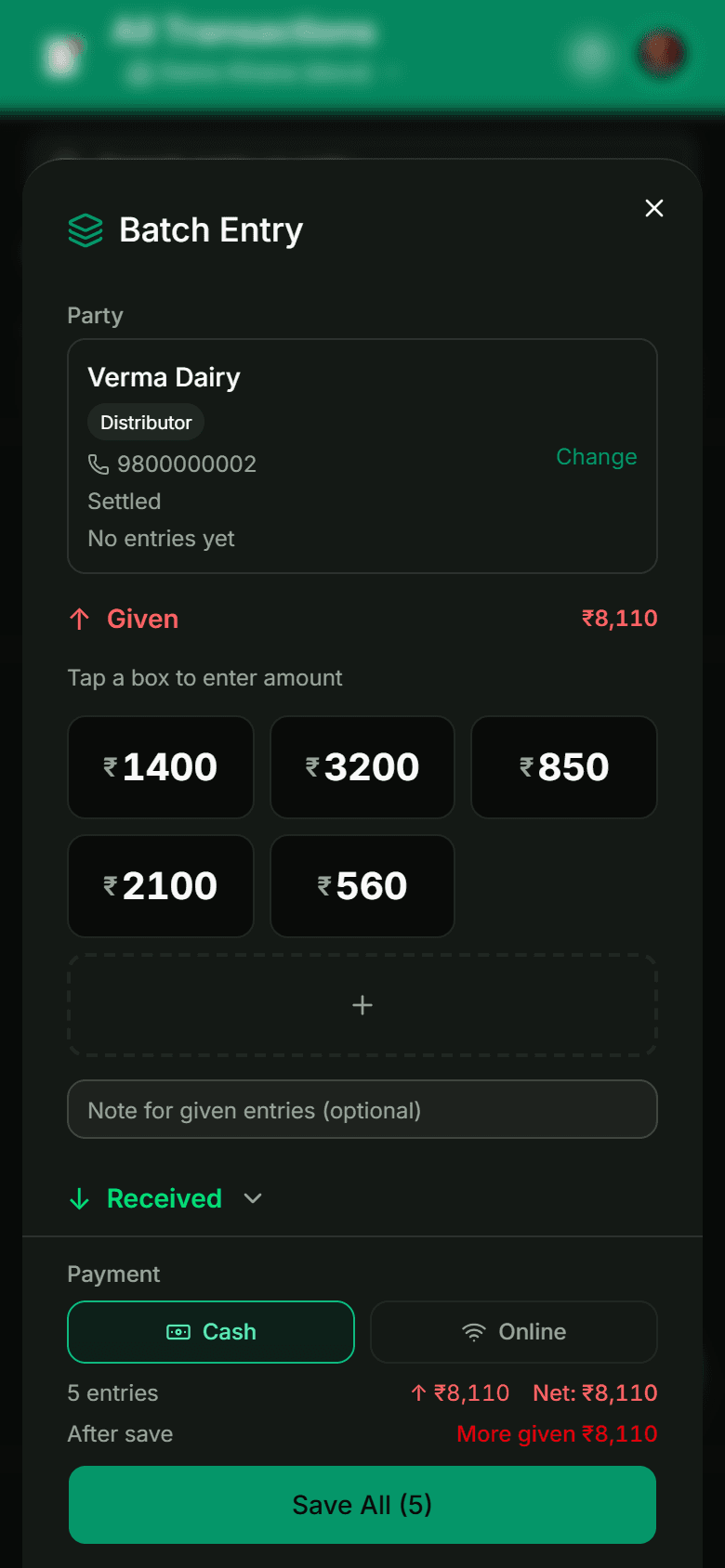
1. Select the party. This comes first and it is not optional — the save button stays disabled until a party is chosen. Once selected you see their current balance and last entry, which is a useful sanity check before you add ₹8,000 to it.
2. Tap a box and enter the amount. The keypad is number-first, so you can work from the invoice without looking up. Enter commits the amount and moves you on. The dashed + box adds another slot when you run past the initial five.
3. Use the right direction group. Amounts you gave go in the Given group; payments received go in Received, which expands separately. Each group carries its own optional note — "week 31 milk supply" applies to every given entry in that batch, so you are not typing it five times.
4. Set the payment method. Cash or Online, applied to the batch.
5. Read the footer before you save. It shows the entry count, the total per direction, the net, and — the useful one — the party's balance after saving. That projected figure is your last chance to catch a misplaced digit.
6. Save once. Every amount posts as its own dated transaction. The party balance recalculates from the entries; nothing is totalled by hand.
The accuracy check that matters
The reason batch entry is safer than a paper tally is not that it is digital. It is that you get a total to compare against before committing.
Do this every time: add up the invoice, then check the batch total matches. If your distributor's invoice says ₹8,110 and the footer says ₹8,110, you are done. If they differ by ₹90, you have a transposed digit and it takes ten seconds to find now — versus an unexplained ₹90 gap you discover in November.
Enter the amounts in the same order as the invoice. It costs nothing and makes a mismatch traceable to a line rather than to the whole batch.
Check the projected balance, not just the batch total
The batch total tells you that you typed the invoice correctly. The after save figure tells you whether the resulting balance is plausible. If a distributor you normally owe ₹8,000 suddenly shows ₹80,000, that is a decimal error the batch total alone would not have caught.
What it does not do
Being clear about this saves frustration:
- It is not multi-party. One party per batch. A mixed list means one batch per party — still much faster, because you select each party once instead of once per amount.
- It is not an invoice importer. There is no photograph-the-bill-and-fill step. You type the amounts.
- It is not free. Batch entry sits on the Pro tier alongside CSV and PDF reports, on plans starting around ₹99 a month.
That last one is worth weighing honestly. If you do one distributor run a week, the time saved is perhaps fifteen minutes a week — real, but you can decide whether it is worth a subscription. If you run several parties' lists daily, it stops being a close call.
Fitting it into a routine
Batch entry works best as a scheduled habit rather than something you reach for mid-rush:
- Do it once a day at a quiet moment — after the evening peak, invoice in hand.
- Keep party names consistent so selection is one search rather than a hunt. "Verma Dairy" beats having both "Verma" and "Verma Dairy Supply" in your list.
- If a batch is large, save in groups of ten to fifteen rather than fifty at once. Smaller batches are easier to reconcile against the invoice, and a mistake affects less.
That last tip contradicts the "fifty in one go" pitch slightly, and deliberately. Fifty amounts in one save is possible; ten amounts in five saves is easier to verify. Speed matters less than a balance you trust.
The wider habit
Batch entry solves a specific bottleneck — a list of amounts for one party. It does not replace the discipline that makes a khata worth keeping: entries made the same day, with what they were for, and balances derived from those entries rather than typed over. That whole system is in how to keep a digital udhar khata.
Once a month you will want the numbers out of the app and into your accountant's hands. Export the ledger as CSV rather than PDF, clear any active filters first, and do it monthly — the export range is capped at 90 days, so a year pulled in one go is not an option.
Got a distributor list waiting? Open LenDen and clear it in one sitting.
Frequently asked
- Can I batch entries for several different parties at once?
- No. Batch entry works on one party at a time — you pick the party, then enter all their amounts together. For a list spanning many parties, you do one batch per party. That is still far faster than single entry, because the party only gets selected once per group.
- Is batch entry free?
- No, it is a LenDen Pro feature, as are CSV and PDF exports. If your day involves long amount lists it pays for itself quickly, but it is fair to know before you plan your workflow around it.
- What if one amount in the batch is wrong after saving?
- Each amount saves as its own dated transaction, so you correct just that one — ideally with a compensating entry rather than a deletion, so the history stays intact. The party balance recalculates on its own.
- Can I mix given and received amounts in one batch?
- Yes. The dialog has separate Given and Received groups, each with its own optional note, and the footer shows you the net of the two before you save.
- Does batch entry work offline?
- Entries save locally and sync when the connection returns, which matters in a shop with patchy data. Watch for any unsynced indicator before you close the app on a large batch.