
Exporting Your Khata for Your Accountant (Without the Shoebox)
18 August 2026 · LenDen Team · 6 min read
Your accountant needs two things from your khata: every transaction in date order, and each party's closing balance. In LenDen those are the Ledger and Party report exports, available as CSV or PDF. Send CSV unless someone needs to read rather than work on it.
One limit to plan around before year end: the export range is capped at 90 days, so a full year is four or five files rather than one.
The short version
- Ledger export = every transaction, dated. Party report = balances by party.
- CSV for your accountant; PDF only for things meant to be read.
- The date range maxes out at 90 days — a year needs 4–5 exports.
- Export monthly, not once in March. Errors are findable while you remember.
- Exports are a Pro feature in LenDen.
What your accountant actually wants
Not a shoebox, and not a screenshot. Three things:
1. A dated transaction list. Every entry with date, party, amount, direction, and note. This is the raw material for the books, and it is the ledger export.
2. Closing balances per party. Who owed what at the period end — receivables. That is the party report.
3. Purchase bills. Your khata shows money moved; a bill proves what it bought. Exports do not replace these, and this is where most small shops lose deductions — an unproved cost gets taxed as though it were profit.
If you hand over those three, cleanly labelled, you will pay your accountant less and get better advice. A shopkeeper who arrives with dated records gets a conversation about tax planning; one who arrives with a bag of receipts pays for data entry.
How the export works
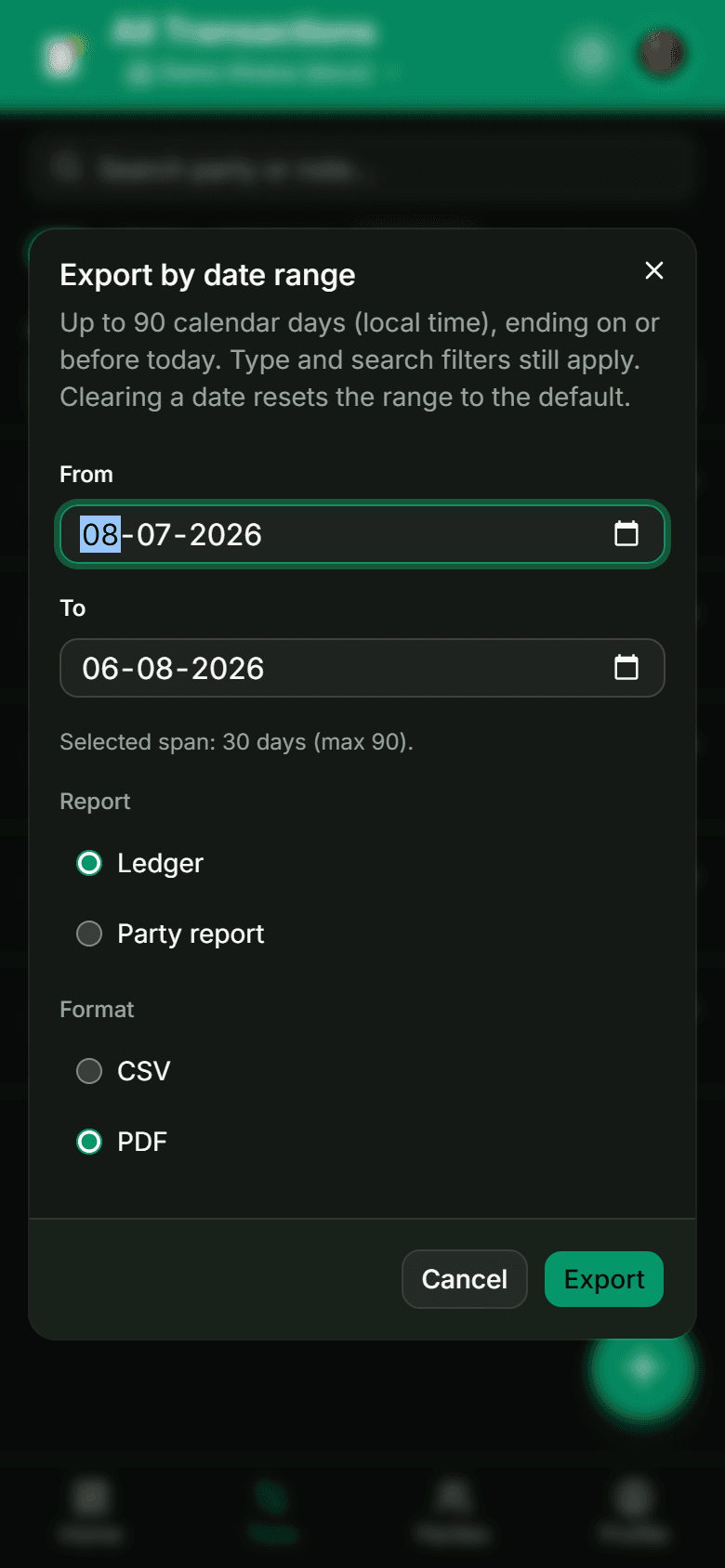
Set the date range. From and To, defaulting to the last 30 days. The dialog states the constraint plainly: up to 90 calendar days, ending on or before today. Clearing a date resets to the default range.
Pick the report. Ledger for the transaction list, Party report for balances grouped by party.
Pick the format. CSV or PDF.
Note that your filters still apply. This is the detail that catches people out — if you had a Given-only filter or a search term active on the transactions screen, the export honours it. Before exporting for your accountant, clear the filters, or you will send a partial ledger and not know it.
Clear your filters before an accountant export
The dialog tells you "type and search filters still apply". An export that silently excludes every Received entry looks complete and is not. Reset to All first.
Working around the 90-day limit
For a financial year running April to March, that is five exports:
| Export | Range |
|---|---|
| 1 | 1 April – 29 June |
| 2 | 30 June – 27 September |
| 3 | 28 September – 26 December |
| 4 | 27 December – 26 March |
| 5 | 27 March – 31 March |
Awkward, and there is no way around it from inside the app. Two practical responses.
The better one: export monthly. On the first of each month, export the previous month as CSV and file it in a dated folder. Twelve small files, no scramble, and you never hit the limit. It also means a mistake surfaces within weeks rather than at filing, while you still remember what the entry was.
The fallback: batch the exports at year end. Do the five ranges above, keep the filenames explicit (ledger-2026-04-01-to-2026-06-29.csv), and let your accountant concatenate them. Do not rename them into something vague — the date range in the filename is what makes them auditable later.
Either way, name files by content and range, not export(3).csv. A folder of ambiguous exports is only marginally better than the shoebox.
The monthly handover routine
Thirty minutes on the first of the month:
- Clear all filters on the transactions screen.
- Export last month's ledger as CSV.
- Export the party report as CSV, so you have a balance snapshot at month end. This is worth keeping even if your accountant does not ask — a monthly series of closing balances tells you whether your receivables are growing.
- Photograph any purchase bills not already captured, into the same dated folder.
- Skim the ledger for anything odd — a duplicate, a missing note, an amount that looks like a decimal slip. This is the cheapest audit you will ever run.
Step 5 is the one that pays. Reading your own ledger once a month catches the errors that are trivial to fix now and archaeology in six months.
Sharing a statement with a party
The party report has a second use beyond your accountant: sending a party their own statement.
Here PDF is the right format — it is meant to be read, not worked on, and it looks like a document rather than a spreadsheet. Sending a party their dated statement each month is quietly the best dispute prevention available to you. A customer who has seen the running total every month rarely argues with it; one who is shown a total for the first time at ₹12,000 very often does.
That connects to the wider point in the complete guide to managing udhaar: balances get disputed when they are a surprise. Regular statements remove the surprise.
The honest caveats
Two, stated plainly.
Exports are a Pro feature in LenDen, alongside batch entry, on plans from around ₹99 a month. We think charging for reports while keeping core entry free is a fair split — but an export paywall does mean the cost of getting your own data out is not zero, and you should weigh that when choosing any khata app. It is one of the checks in best khata apps in India.
The 90-day cap is a real limitation. Monthly exports make it a non-issue, but if you were expecting to pull a full year in one click, you cannot.
Neither is a reason to keep your hisaab in a notebook. Both are reasons to export monthly rather than annually — which is better practice regardless of the tool. Getting entries in accurately is the part that actually matters, and that is covered in how to keep a digital udhar khata.
Frequently asked
- CSV or PDF — which should I send my accountant?
- CSV, almost always. Your accountant needs to sort, filter, and total the data, and a PDF forces them to retype it. Send PDF only when something needs to be read rather than worked on — a party statement you are sharing with the party themselves, for example.
- Is exporting free?
- In LenDen, no — CSV and PDF reports sit on the Pro tier, as does batch entry. It is worth knowing before year end, because an export paywall is a real cost of leaving or of filing.
- Can I export a whole year at once?
- Not in one file. The export range is capped at 90 calendar days, so a full financial year takes four or five exports that you then combine. Plan for that rather than discovering it the night before a filing deadline.
- What is the difference between the ledger and the party report?
- The ledger is every transaction in date order — what your accountant works from. The party report is grouped by party with their balances — what you use to see who owes you, and what you share with a party who queries their total.
- Should I still keep paper bills if everything is exported?
- Yes. Your khata records that money moved; a purchase bill proves what you bought and is what substantiates the cost. Exports and bills do different jobs and your accountant will want both.